

Student Computing Clusters
New Media Station Documentation - iMovie Photos and Still Images
Simple Still Image Clips
iMovie does allow you to import and work with still images, in addition to moving ones. Using the Import item from the file menu, you can select a GIF, JPEG, TIFF, or other format image files. This will create a 5 second video clip that slowly zooms in on your still photo. This clip can be inserted into the clip viewer.
If you wish your still image clip to not zoom in, switch to the Photos pane instead of the Clips pane.
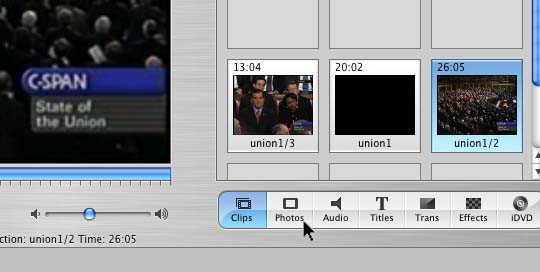
Then uncheck Ken Burns Effect checkbox before importing your still photos.
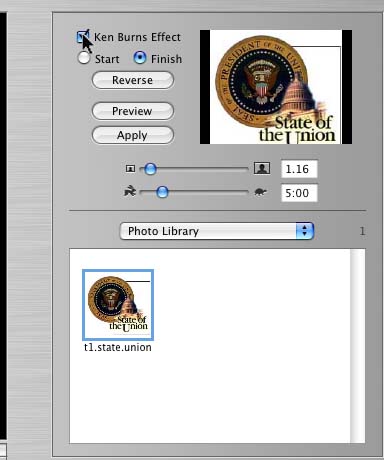
With this featured turned off, you will get a 5 second still image clip created.
You can also make a still image or freeze frame from any video using the Create Still Frame from the Edit menu. You will get a new 5 second still image clip of the currently displayed video frame.
For any still image clip, you can use the Show Info item from the File menu to see and adjust the duration of the clip to as short or as long as you need.
Ken Burns Effect

The Ken Burns Effect is named for well-known documentary file producer Ken Burns (who happens to live in Walpole, NH). It allows you to zoom and pan around a still image. Unfortunately, this feature is only available to images that are in Apple's iPhoto software. If you want to use the Ken Burns Effect when working on UNH's New Media computers, you must first open the iPhoto program and import the photos or other still image files into iPhoto before they will be available to work with in iMovie.
Given that your iPhoto library will most likely be saved to your network home directory, which usually has a 100 M quota, this may limit how many photos you can work with at any time. We recommend that you do not plan to keep your images in an iPhoto library in your home directory permanently. Instead, remove the iPhoto Library folder from the Pictures folder of your home directory when finished working on your project or even when finished importing the photos your need into iMovie.
For full details on using the Ken Burns Effect, see Apple's iMovie Tutorial Lesson 3: Adding Transitions and Photos